By Santiago Fernández de Valderrama Aparicio, Applied AI Operator · Last updated
career-ops vs Huntr
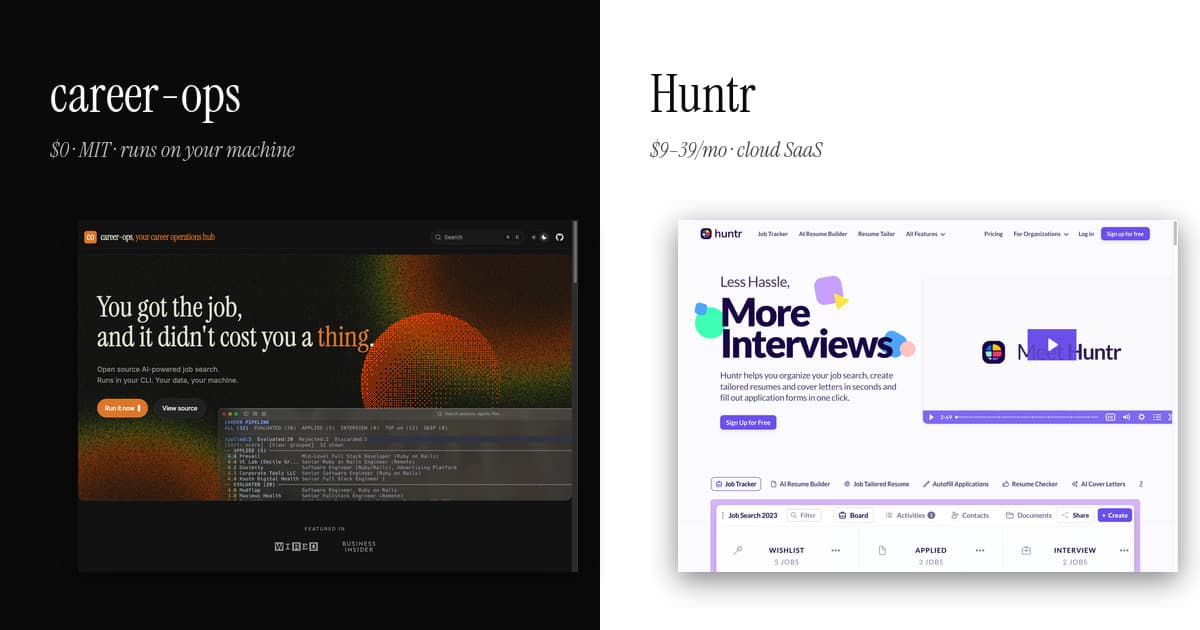
Huntr is the original Kanban job tracker: boards, drag-and-drop, a Chrome extension that clips postings into cards. career-ops includes that tracking stage but adds everything upstream — automated portal scanning, rubric-based AI scoring (five dimensions plus a holistic score), tailored CVs and cover letters — for $0, MIT-licensed, with all data in local files you own instead of a SaaS database.
Huntr is the original Kanban job tracker — boards, columns, drag-and-drop, and a Chrome extension that scrapes job posts into cards. career-ops covers the same pipeline plus scanning, evaluation, and tailoring, but it lives in your terminal and on your disk. Same job, different surface area.
The honest summary
Pick career-ops if the full pipeline plus pre-apply form drafting fits your workflow. Pick Huntr if the Kanban board and mobile app are the features that change your search.
Huntr nailed two things: the Kanban metaphor for a job search and a Chrome extension that turns any job posting into a card with one click. The mobile apps mean you can move cards between columns from a bus. For someone who treats job search as an Asana-style project, Huntr is the right shape.
career-ops covers the same tracker plus the work upstream of it — scanning portals, evaluating listings against a rubric, tailoring CVs per job, drafting applications. It does this in a terminal, with everything as local files you can grep and version-control. The one feature that materially leaves Huntr behind is pre-apply: career-ops's apply mode reads each portal form and drafts answers for every open-ended question (the 15-minute time-sink) from your profile and the JD. You review, paste, submit. Huntr's autofill handles standard fields but not the open-ended questions, which is where applications actually slow down.
Different audiences. Huntr is for people whose primary surface is a browser tab; career-ops is for people whose primary surface is an editor — and who want their portal answers drafted before they sit down to apply.
By the numbers
- Cost over a 12-month search
- career-ops: $0 in software (MIT). Typical AI engine cost: $20/mo CLI subscription you may already pay, or $0 routes via free providers.
- Huntr: $108–$468/year on Huntr paid tiers ($9–39/mo) for AI resume tools beyond the limited free tier.
- Where your search data lives
- career-ops: Plain Markdown/YAML files on your machine — readable without the tool, exportable by copy-paste, never on our servers (there are none).
- Huntr: Huntr's cloud database — applications, resumes, contacts and notes live on their servers under their retention terms.
- Pipeline stages covered
- career-ops: Six: scan → evaluate → tailor → apply prep → track → interview prep.
- Huntr: Two of those six (tracking, plus resume tools in paid tiers) — scanning, scoring and interview prep stay manual.
- Source code
- career-ops: Fully open — 59,000+ GitHub stars, auditable line by line.
- Huntr: Proprietary, closed-source.
Feature matrix
| Feature | career-ops | Huntr |
|---|---|---|
| Application tracker UX | Go TUI dashboard with stages and keyboard navigation. Terminal-native. | Web Kanban board with drag-and-drop columns. Mobile app available. |
| Job scanning | Yes — scan mode hits Greenhouse, Ashby, Lever, Workday, SmartRecruiters APIs. | Manual paste or Chrome extension scrape from any job board. |
| AI evaluation against rubric | Yes — rubric scoring — five dimensions plus a holistic global score — with cited evidence. Gated recommendation at 4.0/5.0. | Match score per job. Algorithm not disclosed. |
| Resume tailoring | Automated per listing — tailor mode generates a CV variant per job. | AI Resume Tailor in paid tier. Manual review required. |
| Cover letter generation | Yes — apply mode drafts per listing using profile and JD context. | Yes — AI Cover Letters in paid tier. |
| Autofill applications | Apply mode generates application content; you paste into the actual form. | Yes — autofills application forms via Chrome extension. |
| Contacts and notes | Free-form markdown files alongside your application data. | Built-in contacts and notes inside each application card. |
| Mobile access | None. Terminal-only. Use SSH if you want it on a tablet. | Native iOS and Android apps. |
| Data ownership | Local files. Applications, resumes, contacts never leave your machine. | Stored on Huntr servers. Standard SaaS data-processing terms. |
| Pre-apply form assistance | Yes — apply mode drafts answers for every open-ended portal question using your profile + JD context. You review, paste, submit. Saves 15-20 minutes per application. | Partial — autofill Chrome extension handles standard fields. Open-ended questions are still on you. |
| Recurring cost | $0 for the tool. Only your AI CLI ($20/mo typical with Claude Pro). | Free tier capped. Paid plans $9–39/month. |
| Source code | Open source, MIT-licensed. | Closed. |
| Press / media coverage | Featured in WIRED Greece and Business Insider (US & DE), April 2026. 44K+ GitHub stars. | Featured in Forbes, Inc., Mashable over the years. Hundreds of thousands of users since 2014. |
Pricing & license at a glance
career-ops
$0 (MIT, open source)
Recurring cost: only your AI CLI subscription (Claude Pro $20/mo typical). Your data never leaves your machine.
Huntr
Free tier limited. Huntr paid plans from $9–39/month depending on tier.
Proprietary, closed-source. Cloud SaaS. Applications, resumes, contacts, and notes stored on Huntr servers.
Frequently asked
- Does career-ops have a Kanban board like Huntr?
- No. The Go TUI dashboard groups applications by stage (scanned, evaluated, applied, interview, rejected) but it is a terminal view, not a drag-and-drop board. If the Kanban metaphor is the reason you use Huntr, career-ops will not give you that.
- Can career-ops replace Huntr for application tracking?
- For technical users who do not need a mobile app or a browser-based UI, yes. The TUI dashboard, the per-application markdown files, and the apply mode cover the same ground. For non-technical users or anyone who wants to move cards on a phone, Huntr is the better fit.
- What does career-ops do that Huntr does not?
- The work before tracking. Scan mode pulls listings from Greenhouse, Ashby, Lever, Workday, and SmartRecruiters via their public APIs. Evaluate mode scores each listing against a rubric of five scoring dimensions plus a holistic global score, with cited evidence. Tailor mode generates a CV variant per job. Huntr starts when you have a posting to track; career-ops starts when you have a profile and want listings worth tracking.
- Is career-ops really free?
- The software is MIT-licensed and costs zero. The only recurring cost is your AI CLI subscription, typically Claude Pro at $20/month for a full job search.
See all comparisons at /compare. Read about the project at /about. The numbers behind the approach: 740 listings, analyzed.